As a social media manager in 2026 you are struggling more than ever. You are expected to plan content calendars, write captions, design graphics, edit short videos, reply to comments, track analytics, and keep up with constantly changing algorithms, all across Instagram, TikTok, LinkedIn, Facebook, X, YouTube, and Pinterest. No wonder so many people are searching for the best AI tools for social media managers.
Any AI tool cannot replace your creativity or how well you understand your audience. What they can do is take over the repetitive work: first drafts, scheduling, resizing, reporting, and monitoring. At Techloopy, we cover tech and AI tools every day, so we compared the most popular options using 2026 reviews, official pricing pages, and common real-world workflows. This guide shows what each tool does best, what it costs, where it falls short, and how to build a stack that fits your budget.
A note on pricing: AI tool plans change often, and many charge per user or per social profile. The prices below are approximate figures reported by reviewers and vendors in 2026. Always confirm current pricing on each company’s website.
Best AI Tools for Social Media Managers at a Glance
| Need | Tool | Approx. starting price |
| Best for ideas and captions | ChatGPT (also Claude and Gemini) | Free plan, paid around $20/month |
| Best for design and visuals | Canva | Free plan, Pro around $15/month |
| Best simple scheduler | Buffer | Around $5 per channel/month |
| Best for teams at scale | Hootsuite | Around $99 per user/month |
| Best for analytics and listening | Sprout Social | Roughly $200+ per seat/month |
| Best for visual planning | Later | Free plan, paid tiers available |
| Best free planning and reports | Metricool | Free plan, paid tiers available |
| Best value publisher | Publer | Free plan, paid tiers available |
| Best for generating full posts | Predis.ai | From around $30/month |
| Best for brand monitoring | Brand24 or Brandwatch | Paid, custom pricing for enterprise |
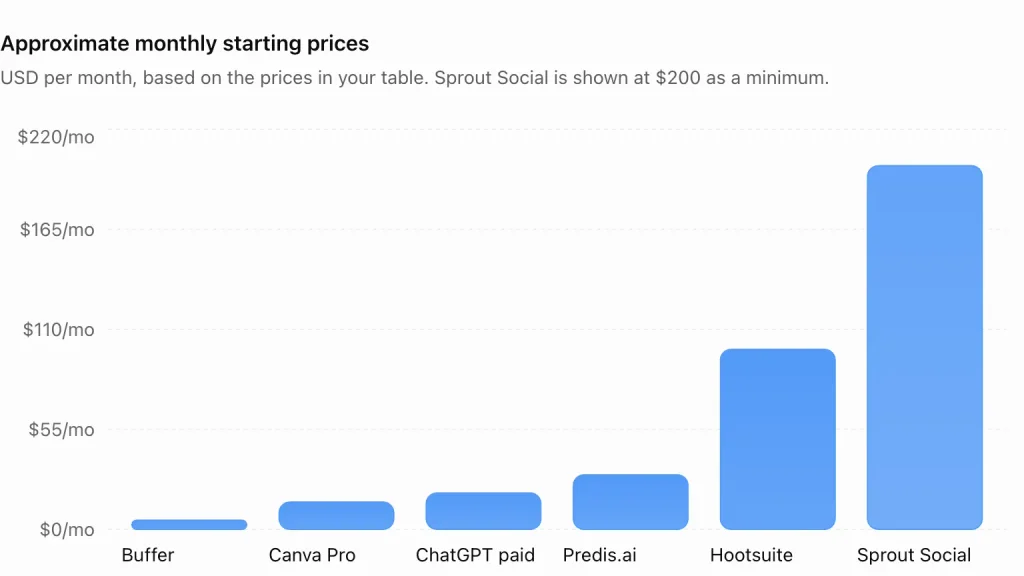
If you only want the short version: most solo managers do well with ChatGPT or Claude for ideas, Canva for visuals, and Buffer or Publer for scheduling. Agencies and larger brands should look at Hootsuite or Sprout Social.
How We Chose the Best AI Tools for Social Media Managers
We focused on what actually saves a social media manager time:
- Content creation help. Captions, hooks, hashtags, images, and video ideas.
- Scheduling and automation. Best-time posting, queues, and multi-platform publishing.
- Analytics and reporting. Clear performance data and insights, not just pretty charts.
- Social listening. Tracking brand mentions, sentiment, and trends.
- Engagement tools. Inbox management, reply suggestions, and comment moderation.
- Ease of use. Can a beginner get value in the first week?
- Pricing and free access. Is there a useful free plan, and are the paid tiers fair?
- Team features. Approvals, roles, and collaboration for agencies and in-house teams.
We also cross-checked multiple 2026 roundups, because vendors reviewing their own category tend to rank themselves first.
The Best AI Tools for Social Media Managers in 2026
1. ChatGPT, Claude, and Gemini: Best AI Assistants for Ideas and Captions
General AI assistants are the most flexible tools in a social media manager’s kit. You can use them to brainstorm content pillars, write caption variations, create hooks, draft replies, summarize competitor posts, and build a month-long content calendar in minutes. ChatGPT is the most widely used. Claude is often praised for natural, nuanced writing, and Gemini works smoothly with Google’s apps.
Pricing: All three offer free plans. Paid plans generally start around $20 per month.
Pros: Extremely flexible, fast first drafts, great for repurposing one idea across platforms
Cons: They do not schedule posts on their own, and drafts can sound generic without a clear brand voice brief
Best for: Every social media manager, especially solo creators and small teams. Our guide on how to use ChatGPT for content marketing includes prompts you can adapt for social posts.
Transparency note: Claude is one of the tools we cover, and we have judged it by the same standards as every other tool on this list.
2. Canva: Rated as best AI Tool for Social Media Designs
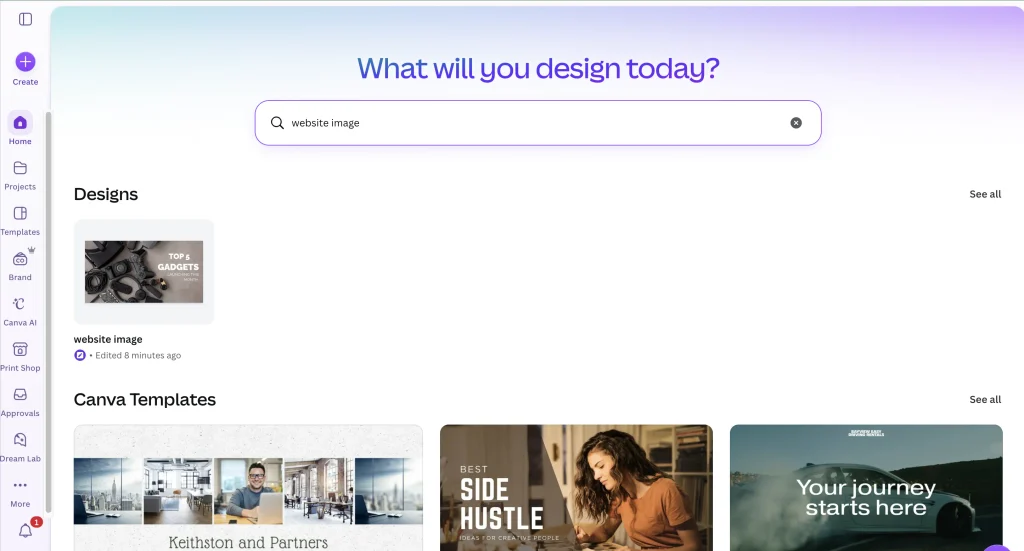
Canva remains the go-to design platform for non-designers. Its AI tools can generate images, resize one design for multiple platforms, remove backgrounds, write text, and help you create branded templates. Many managers build a Brand Kit once and then produce graphics for every channel in minutes.
Pricing: Free plan available. Canva Pro costs around $15 per month, with team plans for larger groups.
Pros: Huge template library, easy for beginners, strong brand kit tools, quick resizing
Cons: AI image quality varies, and heavy use of templates can make brands look similar
Best for: Small businesses, solo managers, and anyone who needs polished visuals fast.
3. Buffer: Best Simple Scheduler With AI Help
Buffer has long been a favorite for its clean, easy interface. Its AI Assistant helps write and rewrite captions, and it makes it simple to tailor one post for several channels. Reviewers often name it the best starting point for solo creators and small businesses because it balances price and features well.
Pricing: Paid plans start around $5 per channel per month, and a free plan has historically been available. Check the current plans.
Pros: Beginner-friendly, affordable, clear interface, AI assistant included.
Cons: It is lighter on deep analytics and social listening than any other enterprise tools.
Best for: If you are a Solo creator, freelancers, and small businesses.
4. Hootsuite: Best for Teams Managing Many Accounts
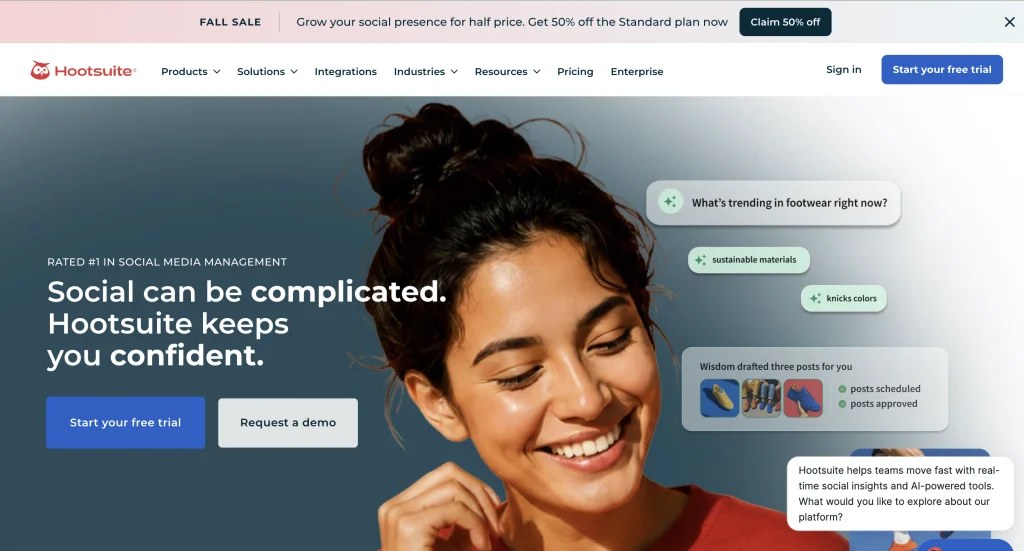
Hootsuite is one of the oldest names in social media management, and it still offers one of the broadest feature sets. It combines scheduling, a shared inbox, analytics, social listening, and AI writing help in one dashboard. That makes it a common choice for agencies and marketing teams that manage many profiles at once.
Pricing: Plans start around $99 per user per month on annual billing, and higher tiers cost more.
Pros: Broad feature set, strong team workflows, good for multi-platform management.
Cons: It is comparatively expensive for solo users, and the interface can feel a little crowded.
Best for: Agencies and in-house teams with larger budgets.
5. Sprout Social: Best for Analytics, Listening, and Customer Care
Sprout Social focuses on insights. Its AI features help summarize sentiment, suggest replies, and surface trends from conversations, which is why it is popular with brands that use social for customer service and reputation management. The reporting is among the best in the industry.
Pricing: Per-seat pricing that generally starts around $200 per month and rises with plan level. A free trial is usually available.
Pros: Deep analytics, excellent social listening, strong reporting for clients and executives
Cons: Priced for established teams, and probably more than a small account needs
Best for: Mid-size brands, agencies, and customer-care teams.
6. Later: A tool fits best for Visual Planning on Instagram and TikTok
Later is built around visual planning. You can drag and drop posts into a calendar, preview your Instagram grid, and use AI to help with caption ideas and best-time suggestions. It is a natural fit for lifestyle, fashion, food, and creator brands that care about how their feed looks.
Pricing: Free plan available, with paid tiers and AI credits for heavier use.
Pros: Beautiful visual planner, great for Instagram, TikTok, and Pinterest, easy for creators.
Cons: AI features can be credit-based which limits its use for free, and it is less suited to complex team workflows.
Best for: Visual-first creators and small brands.
7. Metricool: Best Free Option for Planning and Analytics
Metricool is a tool which works as a content planner, analytics, competitor benchmarking, and ad reporting in one place. Its free plan is popular with beginners, and its reporting tools help freelancers show clients what is working without spending hours on spreadsheets.
Pricing: Free plan available, with paid tiers for more profiles and features.
Pros: Great reporting, competitor tracking, accessible pricing.
Cons: The interface has a learning curve, and its AI writing tools are lighter than some rivals.
Best for: Data-driven managers, freelancers, and small agencies.
8. Publer: Best Value for Multi-Network Publishing
Publer is often named the best value in the category. It handles scheduling across many networks, includes AI help for captions and images, and keeps costs low for teams that need to manage a lot of accounts. If you want solid features without enterprise pricing, it deserves a trial.
Pricing: Free plan available, with affordable paid tiers.
Pros: Strong value, supports many networks, useful AI tools.
Cons: Analytics are lighter than enterprise platforms.
Best for: Freelancers and small teams who manage multiple accounts on a budget.
9. Predis.ai: Best for Generating Complete Social Posts
Predis.ai goes further than a caption generator. You can feed it a product, a blog post, or a URL, and it creates complete posts with copy, images, and sometimes short videos. It is especially helpful for ecommerce brands and busy marketers who need volume.
Pricing: Plans start around $30 per month, with pricing varying by credits and features.
Pros: Fast post generation, turns existing content into social posts, helpful for product marketing.
Cons: Output can feel formulaic, so you will want to edit heavily.
Best for: Ecommerce brands and marketers who need many posts quickly. If you publish blog content too, pair it with our roundup of the best AI writing tools for bloggers.
10. Brand24 and Brandwatch: For Social Listening
Social listening tools are the ones which track brand mentions, keywords, and competitors across social platforms and the web. Brand24 is known as an affordable real-time option, while Brandwatch is aimed at larger enterprises with deeper analytics. AI features help summarize sentiment and flag spikes in conversation, which can warn you about a crisis early or reveal content ideas.
Pricing: Brand24 offers tiered paid plans, and Brandwatch uses custom pricing.
Pros: Early warning for brand issues, useful trend and competitor insights
Cons: Can be expensive, and sentiment analysis is not always accurate with sarcasm or slang
Best for: Brands that care about reputation and market research.
Honorable Mentions
FeedHive is popular for recycling evergreen posts and conditional automation. SocialPilot offers scheduling and AI help at a friendly price. Vista Social weaves AI into publishing, inbox, and reporting. Jasper is strong for brand voice and team copywriting. OpusClip and CapCut help you turn long videos into short clips, which we cover in our guide to the best AI video editing tools for creators. Perplexity is useful for researching trends with cited sources.
Which AI Tool Should You Choose?
- You are a solo creator on a tight budget: ChatGPT or Claude free, Canva free, plus Buffer or Publer
- You run an ecommerce store: Predis.ai, Canva, and a scheduler like Later
- You manage clients as a freelancer: Metricool or Publer plus ChatGPT or Claude
- You lead a marketing team: Hootsuite or Sprout Social
- You care about customer care and reputation: Sprout Social plus Brand24 or Brandwatch
- You focus on Instagram or TikTok visuals: Later and Canva
How to Build Your AI Social Media Stack by Budget
You do not need ten subscriptions. Match your tools to your stage:
- Starter ($0 to $20 per month): A free AI assistant, Canva Free, and the free plan of Metricool or Publer.
- Growing manager (about $40 to $100 per month): One paid AI assistant, Canva Pro, and a scheduler like Buffer, Publer, or Later.
- Agency or in-house team ($200 and up per month): Hootsuite or Sprout Social, a listening tool, a design tool, and a paid AI assistant.
Start small, track which tools you open every day, and cancel anything that sits idle.
A Simple AI Social Media Workflow That Works
The best managers use AI to speed up the repetitive parts while keeping strategy and personality human.
- Research. Use an AI assistant and a listening tool to find audience questions, trends, and competitor ideas.
- Plan. Ask your AI to build a content calendar around 9-10 content pillars, then edit it to fit your brand.
- Draft. Generate caption options, hooks, and hashtag ideas, then rewrite them in your own voice.
- Create visuals. Build graphics in Canva and edit video clips with a tool like CapCut. A good phone helps here, and our guides to the best budget smartphones under $300 and the Vivo V80 vs iPhone Duo camera comparison can help you pick one.
- Schedule. Queue posts at your audience’s best times using your scheduler.
- Engage. Reply to comments and messages personally. Use AI only for draft suggestions.
- Measure. Review analytics weekly, then adjust your content plan.
- Repurpose. Turn top-performing posts into carousels, short videos, newsletters, and blog posts.
If your social strategy also feeds a blog, our roundup of the best AI SEO tools in 2026 shows how to connect the two.
Prompts Social Media Managers Can Copy Today
Content pillar prompt: I manage social media for a [type of business] in the US. Suggest five content pillars and 10 post ideas for each, mixing education, entertainment, and promotion.
Caption prompt: Write five Instagram captions for this post: [description]. Use a friendly, confident tone, keep each under 150 characters, and end with a question.
Hook prompt: Give me 15 TikTok video hooks for [topic] aimed at [audience]. Make them curiosity-driven and under 12 words.
Repurpose prompt: Turn your blog posts into your LinkedIn posts, a five-tweet thread, and a 30-second video script. Keep the main takeaways.
Reply prompt: Suggest three polite replies to this customer comment. Keep them human, helpful, and under 40 words. Comment: [paste]
Specific prompts with real context almost always give better results than vague ones.
AI Social Media Rules and Risks to Know
AI makes social media faster, but it also adds responsibilities.
- Disclose sponsorships and affiliate links. The US Federal Trade Commission expects clear disclosure.
- Label AI content when required. Platforms like YouTube, Instagram, and TikTok have policies about realistic AI-generated or altered content. Check each platform’s current rules.
- Do not impersonate or mislead. Avoid fake testimonials, fake reviews, and deepfakes.
- Protect your brand voice. Review every AI draft before it goes live. That’s very important as giving your content a touch of your personality makes the reader connected.
- Protect customer data. Do not paste private information into AI tools for you and your customer as it can breach privacy.
- Follow platform rules. Automated mass commenting or following can get accounts restricted.
- Watch for bias and errors. AI can get facts and tone wrong.
Common Mistakes Social Media Managers Make With AI
- Posting raw AI output. Unedited copy often sounds generic and robotic.
- Automating engagement. Followers can tell when comments are automated.
- Ignoring analytics. Tools are only useful if you learn from the data it provides and use it wisely to grow yourself.
- Using too many tools. A big stack creates more work, not less.
- Skipping brand guidelines. Without clear instructions, AI will default to a bland tone.
- Chasing every trend. Not every viral format fits your brand.
- Forgetting accessibility. Add alt text and captions so everyone can enjoy your content.
How to Measure the ROI of AI Tools
Before you buy a tool, decide what success looks like. Track the hours saved per week, the number of posts published, engagement rate, follower growth, website clicks from social, and leads or sales. Compare the numbers before and after adding a tool, and review them after 30 to 60 days. If a tool does not save time or improve results, cancel it.
Frequently Asked Questions
Which is the best AI tool for a social media manager in 2026 to grow fast?
There is no single best tool for everyone. ChatGPT and Claude are great for ideas and captions, Canva is the top choice for design, Buffer and Publer are strong schedulers for small teams, and Hootsuite and Sprout Social suit larger organizations.
What is the best free AI tool one can use for social media?
Free plans of ChatGPT, Claude, Gemini, and Canva cover content ideas and design. For scheduling and analytics, Metricool and Publer both offer useful free plans, though limits apply.
Can AI replace social media managers?
No. AI is excellent at drafts, scheduling, and reporting, but it cannot build real relationships, understand local culture the way a person does, or make strategic decisions. Most of the teams use AI to augment their work, not completely replace it.
Which AI tool is best for writing social media captions?
ChatGPT, Claude, and Gemini are all strong for caption writing. Dedicated tools like Jasper, Predis.ai, and the built-in assistants in Buffer and Hootsuite can also help. Always edit the result to match your voice.
Which social media scheduler has the best AI features?
Hootsuite and Sprout Social have the broadest AI toolsets for teams. Buffer and Publer offer the best value for smaller budgets, and Later is a favorite for visual planning.
Is it safe to use AI for posting on social media?
It is safe if you review posts before publishing, disclose sponsorships, avoid misleading content, and follow each platform’s rules on AI-generated media. Make sure you never end up sharing confidential data with AI tools that can be risky.
How much should I spend on AI tools for social media?
Start with free plans. Many solo managers spend roughly $20 to $100 per month on one AI assistant, a design tool, and a scheduler. Agencies and larger teams may spend several hundred dollars a month on enterprise platforms.
Do I need to tell people when I use AI?
There is no universal rule for every situation, but you should always disclose sponsored content, and you should follow platform policies for realistic AI-generated images and video. Being open about your process also builds trust.
Final Thoughts
The best AI tools for social media managers in 2026 give you back time without taking away your voice. Start with a flexible assistant like ChatGPT or Claude, add Canva for visuals, and choose a scheduler that matches your size, whether that is Buffer, Publer, Later, Hootsuite, or Sprout Social. Use analytics and listening tools to learn what your audience wants, and keep real human conversation at the center of your strategy. Test tools on free plans first, measure the results, and keep only what works. For more practical guides on tech, gadgets, and AI tools, keep exploring Techloopy.
About the Author
Techloopy Team writes about tech, AI tools, smartphones, and digital marketing for readers across the United States. At Techloopy, our goal is to turn complicated technology into clear, practical advice you can use right away. We compare features, track pricing, and share honest guides to help social media managers, creators, and small businesses work smarter. Visit Techloopy for more AI tools guides, reviews, and tech updates.
Disclosure: This article is for informational purposes. Tool features and prices can change, so please verify current details on each provider’s website. If Techloopy earns a commission from any links in the future, we will disclose it clearly.